All Projects
Client work, anonymized
2026, ITSM & Automation, Internal Tools
Guided Tour: in-app onboarding tours
Step-by-step hints on top of any SimpleOne page. A new tour is built by clicking page elements, with no developer and no changes to the page's own code.
Live2 min read
- New tour
- No developer needed
- First tour
- 14 steps
- Languages
- RU and EN
Problem
A new employee opening a complex screen for the first time needs to see quickly what is where. The first such screen was the dashboard builder. The client also wanted analysts and admins to build tours for other pages themselves, without a programmer.
What was built
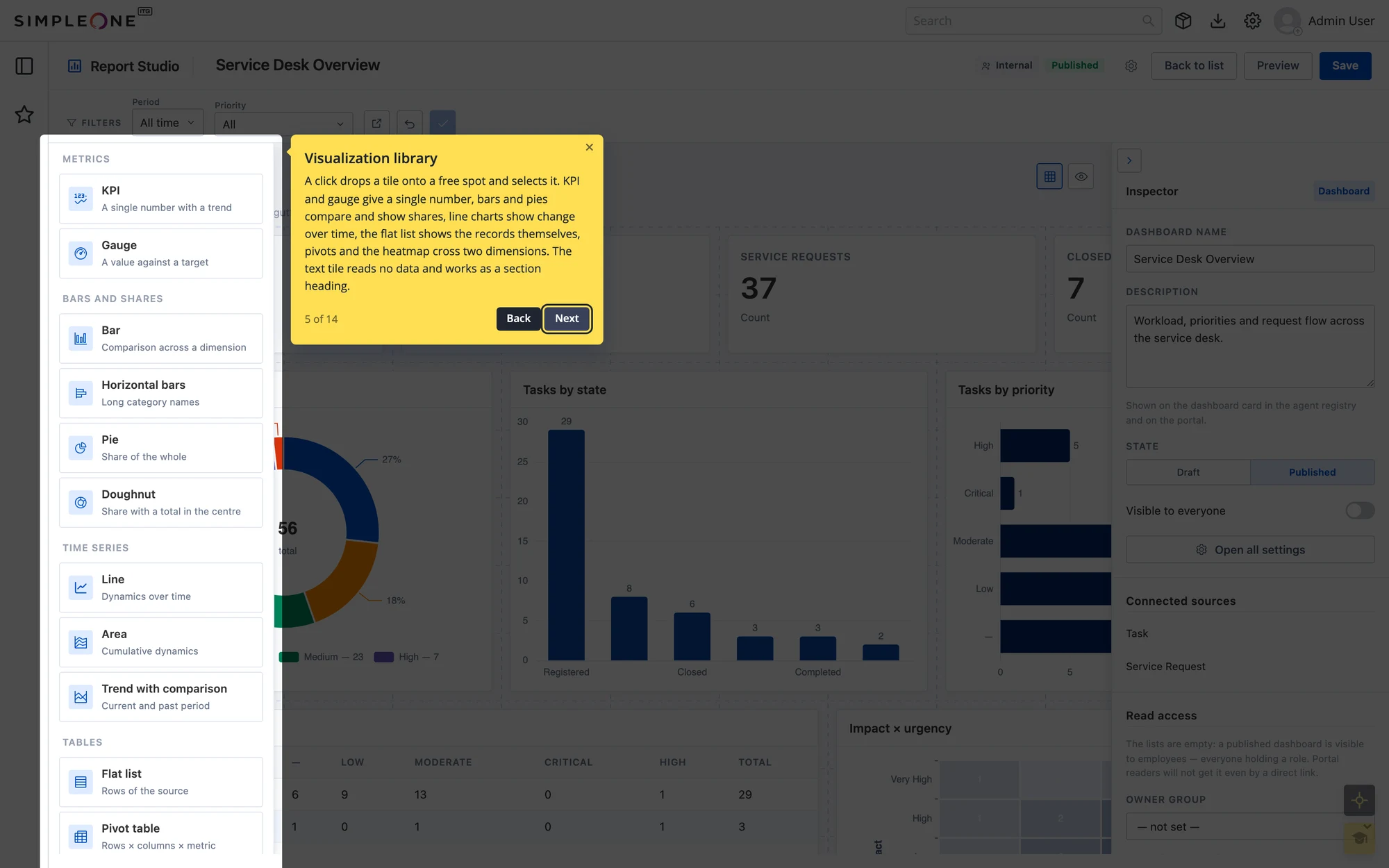
- A tour on top of any page. Hints highlight an element and explain it; steps advance with buttons or the arrow keys.
- An invitation instead of a pushy autostart. Someone opening the page for the first time is offered a short tour after a couple of seconds. They can take it or decline, and the choice is remembered.
- Build mode. The author clicks an element on the page and the step binds to it. A panel shows which steps found their element on this page and which did not.
- Inline hints. A question-mark icon next to a single field explains just that field without running the whole tour.
- Color themes. Each tour has its own theme, so onboarding for different sections looks different.
- Progress tracking. It shows who finished a tour, who dropped out and at which step, which points to overloaded steps.
- The first tour covers the dashboard builder: 14 steps in Russian and English.
- A guide for tour authors and a technical description.
How it works
- A tour is records, not code. The widget detects which page it is on and finds the matching tours and steps. The page being toured needs no changes: the dashboard builder did not need a single edit.
- One step does not break the tour. If an element is missing, say a collapsed panel, the step can be skipped and the tour goes on.
- Bindings are chosen to last. When a step is picked by click, the builder prefers element attributes that survive layout changes, so tours do not break with every UI tweak.
Screenshots
A tour step: the hint highlights the visualization library and explains what it holds
The invitation for someone opening the page for the first time
Build mode: tour steps marked by whether their element was found; hovering outlines it on the page
Related projects